
Local AI: run Large Language Models securely on your own infrastructure
The use of Large Language Models (LLMs) such as ChatGPT has become hugely popular since OpenAI released ChatGPT in November 2022. Since then, many more companies have launched similar LLMs, such as Google's Gemini, Anthropic's Claude, xAI (Twitter) Grok, and more. This choice is great for users, but it also presents a major challenge for organizations: data sovereignty.
It's great that there are so many options, but choosing one of these parties also means choosing which organization is allowed to process all the data you send when you work with their chatbot. Choosing a provider often means trusting them to handle every piece of information you enter with care. Privately, that privacy consideration may seem limited for a single question. For companies, the stakes are much higher. Organizations must ask a crucial security question: can we take the risk of employees uploading proprietary source code, financial spreadsheets, or sensitive customer documents to a third-party cloud?
Fortunately, there are ways to harness the power of LLMs without sending all kinds of data to OpenAI and similar parties. In this blog, I will show you how to set up LLMs locally on your laptop/PC or server, and how you can use an LLM privately on personal documents. While still benefiting from advantages such as lightning-fast summaries, creative brainstorming, and advanced data synthesis. By hosting these models on your own hardware, you gain the freedom to process sensitive datasets, such as financial data or private intellectual property, without worrying that it will be used for training or stored on an external server. This bridges the gap between state-of-the-art intelligence and uncompromising data sovereignty.
Before I go into the setup and what you need, I will first provide some background information about LLMs and terms that you often encounter online. The installation itself is relatively simple, but if you delve into it, you will quickly see that there are many variants: model types, file formats, parameter sizes, quantization methods, and so on.
Model Files
There is a wide variety of public LLM models available. A popular place to find LLM models is huggingface.com/models. People and companies upload their models there, although the website is not always very intuitive. Many tools also offer an easy way to download models. Finding free models is easy; choosing a suitable model/file requires a little more attention. Popular free models to explore include Phi (Microsoft, smaller models), Qwen (Alibaba), Llama (Meta), Mistral, DeepSeek, and Gemma (Google). Try a few popular models and see what works well for your use case.
File types
Most LLM models you find online are .gguf or .safetensors files. These files contain the complete LLM model and can therefore be quite large. Make sure you use a tool that supports one of these file formats, otherwise you will limit your choice and ultimately the usability of your local deployment.
The role of an LLM
Many LLMs are trained for a specific role or use case. This is often reflected in the file name. If it contains "instruct," the model is intended for chat-like interaction, such as ChatGPT. If you see "text" or no clear indication, it is usually a base model that is primarily intended to follow text. You may also encounter terms such as "reason(ing)" or an "r" version: similar to instruct, but the LLM also displays the reasoning steps it took to arrive at the answer.
Parameter size and quantization
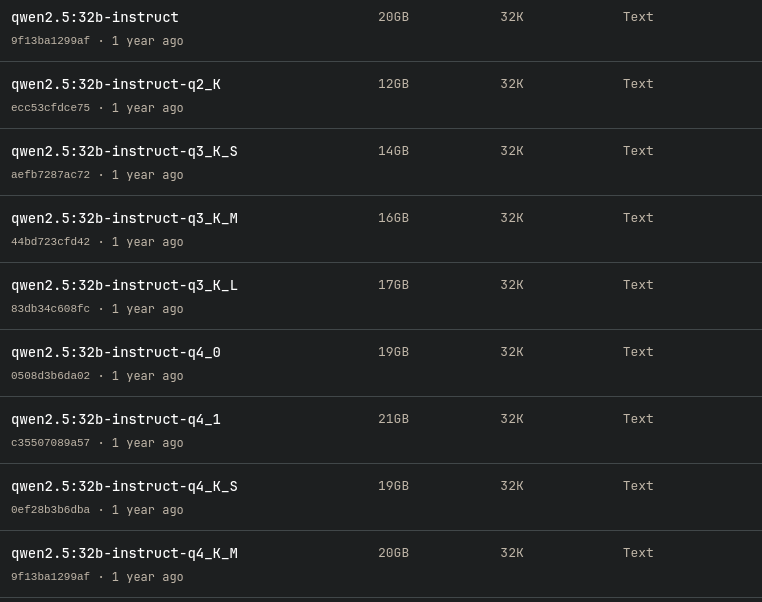
When selecting a model, you will often see multiple variants of the same model. For example, if you want to use qwen2.5, you can choose from 0.5b, 1.5b, 3b, 7b, 14b, 32b, and 72b. This number represents the number of parameters (b = billion). The larger the number, the larger the model and, generally, the better it can handle complex tasks. However, the file size also increases significantly, and with it the RAM/VRAM requirements to load the model. Because files can become so large, there are methods to make the model smaller with as little loss of quality as possible: quantization. In the image below, for example, you can see the different quantized variants of Qwen2.5 32b. You often choose quantization because your hardware is limited, but you still want more parameters. Keep in mind that this usually comes at the expense of quality. Keep it practical: look at the file size and what fits in your memory. More on that later.
What do you need?
You can run LLMs on virtually any computer, even on embedded devices such as a Raspberry Pi or a smart camera. However, the performance and types of models you can use are limited. The two most important hardware components to consider are CPU RAM and GPU VRAM. GPUs, which are best suited for running/training LLMs, have a limited amount of working memory. For maximum performance (and increasingly, to be able to run a model at all), one or more dedicated GPUs are required, with NVIDIA generally offering the best support.
Due to the matrix calculations required by LLMs, you can also run them on CPUs, but the performance is usually much lower than on GPUs, which are optimized for this type of calculation.
To determine how much (V)RAM you need, you can roughly estimate based on the file size of the model.
There are tricks to improve CPU performance, but that is beyond the scope of this article.
Please note: it is technically possible to load larger models that do not fit in your RAM; the system will then swap to your SSD/HDD. However, this makes the LLM extremely slow and does not provide a pleasant experience.
Setup
For this example, we will use qwen3:8b-q4_K_M. My test system has a 12-core CPU and 32GB RAM and runs on Linux, without a dedicated GPU.
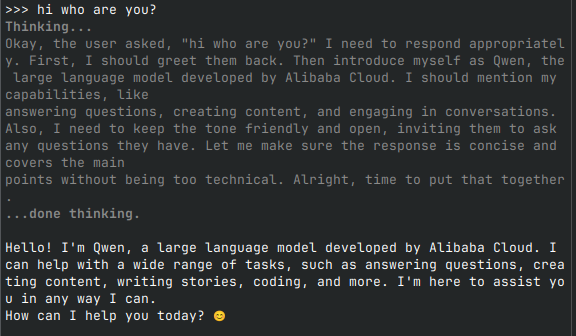
The first tool I use is Ollama. Ollama is a CLI interface that allows you to interact with an LLM. It also unlocks the LLM via HTTP, allowing you to access it via curl or via Python and JavaScript. To install Ollama, go to https://ollama.com/download and select your operating system. After installation, run the command ollama run qwen3:8b-q4_K_M. This automatically downloads the model and starts it, after which you can ask questions. Done.
You now have a fully functional LLM running locally, without sending data to a data center. The image below shows an example in which qwen3 is a thinking model, meaning it reasoned about the steps needed to provide an answer.
Ollama is ideal for quickly starting an LLM and when you want to build an LLM agent in Python or JavaScript. You can also combine it with popular packages such as Langchain/Langgraph in Python. Ollama also supports embeddings (for documents), but this requires some programming work. There are also tools with a UI that give you a ChatGPT-like experience in the browser.
GPT4ALL
GPT4ALL offers a user interface that allows you to easily install models, create custom databases with information that the LLM can use, and have a chat interface that clearly displays the conversation. Please note: GPT4ALL collects anonymous user data, but you can disable this in the settings or run it completely offline. Its strength lies in the fact that you can easily upload local documents and then ask the LLM questions about those documents.
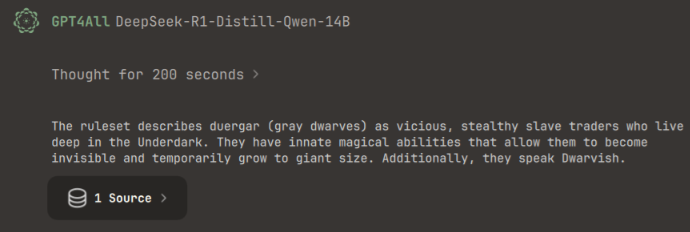
Download GPT4ALL from https://www.nomic.ai/gpt4all. After launching it, go to chat or models and install a model. It will show you how much RAM you need. In this example, I chose DeepSeek-R1-Distill-Qwen-14B. Then I went to the LocalDocs tab and created my own document store. I selected a folder with one PDF: the basic rule set for Dungeons and Dragons, 115 pages. GPT4ALL then creates embeddings, i.e., it converts words from documents into vectors so that the LLM can use the information in the chat. Depending on the number and size of documents, embedding can take a while; this also depends on your system. By default, GPT4ALL only embeds files with these extensions: .docx, .pdf, .txt, .md, .rst. You can add more extensions, but GPT4ALL cannot guarantee that it will always work properly.
Then go to Chats, select the model you downloaded, and choose the LocalDocs you just created in the top right corner. Simply ask a question about the documents and the model will use the documents to provide answers. This may be a bit slow, so please be patient. I asked DeepSeek: "What does the ruleset say about Duergar?" The answer can be seen in the image below and corresponds to the description of the Duergar in the ruleset.
Why would you use a local LLM?
Data protection
As mentioned in the introduction, the power of a local LLM is that all questions you ask and all documents you upload remain within your local environment. No data is shared with a data center. Furthermore, the model itself is not capable of "storing" the data you enter. This means you have complete control over your data and can safely ask questions about proprietary source code or confidential documents.
This is also valuable for situations where a system must be air-gapped (i.e., disconnected from the internet). Both Ollama and GPT4ALL keep data within your local network and do not rely on an internet connection.
Cost savings
By running locally, you avoid API costs, which can quickly add up with high volumes and constant use. You do have initial investment costs and operational costs (such as electricity), but it doesn't matter whether you generate 10 tokens or 10 million tokens: you don't pay per token. You go from variable, unpredictable API costs to a fixed investment. An additional advantage: paid LLM APIs often have rate limits on the number of requests. This can cause downtime or extra costs to increase your rate limit. Locally, there is no rate limit on the API; your hardware is the only limitation.
Both Ollama and GPT4ALL can make models available via their own API. This is useful if you already have applications that query LLMs via an API. You then reduce the costs you would otherwise incur by using paid LLM APIs.
Latency
With GPUs, the latency of a locally hosted LLM can be significantly lower than with API calls to a data center. You are communicating with a local system that is available to you, without a long network route and without shared resources. This increases the response speed.
Trade-offs
Of course, there are also disadvantages to self-hosting. You have to manage the LLM model, keep track of updates, and sometimes do troubleshooting. That takes time and effort and is therefore part of the TCO. In addition, hardware costs (CAPEX) can be a significant initial investment, rather than a pay-as-you-go (OPEX) model.
Ollama requires a little more setup but offers a lot of flexibility. GPT4ALL is more of a total package with UI and makes uploading documents very easy, but with less flexibility. For example, if you want to offer employees a ChatGPT-like experience, but locally, then GPT4ALL is often a good choice. If you have applications that require a generic interface with an LLM, then Ollama is more logical because it offers a general API that many tools can work with.
Start your Local LLM Journey today
The shift to local AI is a fundamental change in how we interact with technology: from "data for services" to true digital sovereignty. As open-source models continue to close the gap with closed-source alternatives, the argument for "hosting your own intelligence" grows stronger. By starting your local LLM journey today, you're not only protecting your data; you're also building a private foundation for the future of your digital workflow. If your organization is exploring how to deploy AI safely and responsibly, we can help you evaluate your options and design a setup that balances performance, compliance, and long-term costs.